Not a viewer. A drafting workspace.
Your scan opens already measured — then it is a model you draw in, document and export, without leaving the browser. Every picture below is the real workspace, on the sample apartment.
Your scan, opened as a drawing you can work on
The measured plan of the sample apartment — 8 rooms, 32 walls, 23 openings — in the full workspace, in your browser.
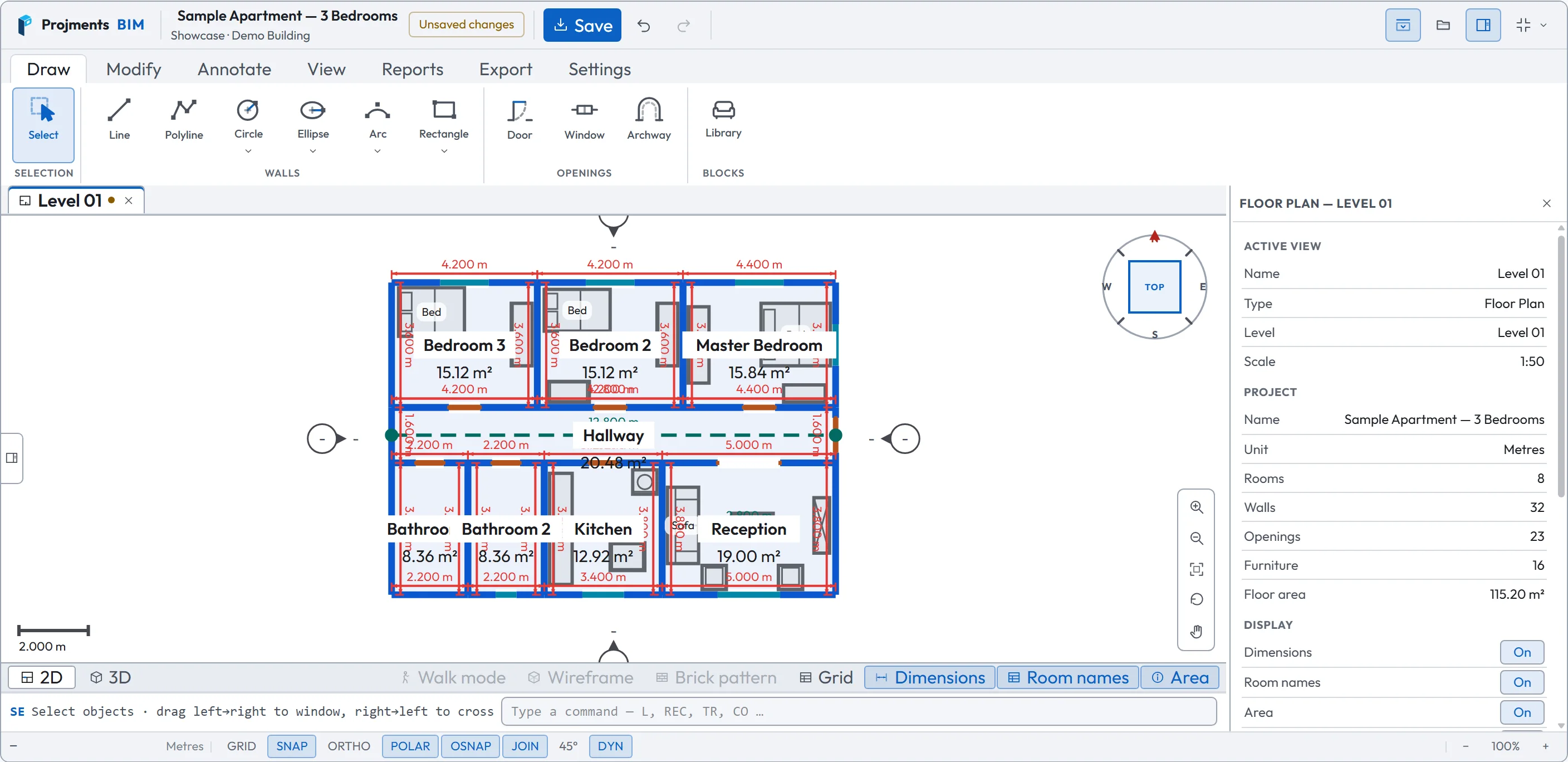
Draw, Modify, Annotate, View, Reports, Export, Settings.
Line, polyline, circle, ellipse, arc and rectangle all draw walls.
The Level 01 floor plan, here — open several side by side.
Type L, REC, TR, CO… — the aliases a draughtsman already knows.
Door, window and archway, placed on a wall.
Turn the plan so any side is at the top.
The active view and the project: rooms, walls, openings, floor area.
- 1Seven tabsDraw, Modify, Annotate, View, Reports, Export, Settings.
- 2WallsLine, polyline, circle, ellipse, arc and rectangle all draw walls.
- 3OpeningsDoor, window and archway, placed on a wall.
- 4Views open as tabsThe Level 01 floor plan, here — open several side by side.
- 5View compassTurn the plan so any side is at the top.
- 6PropertiesThe active view and the project: rooms, walls, openings, floor area.
- 7Command lineType L, REC, TR, CO… — the aliases a draughtsman already knows.
Edit it the way you edit a CAD drawing
Pick an object and its grips and properties appear. Move, copy, trim, offset, fillet — with snaps, ortho and polar tracking on the status bar.
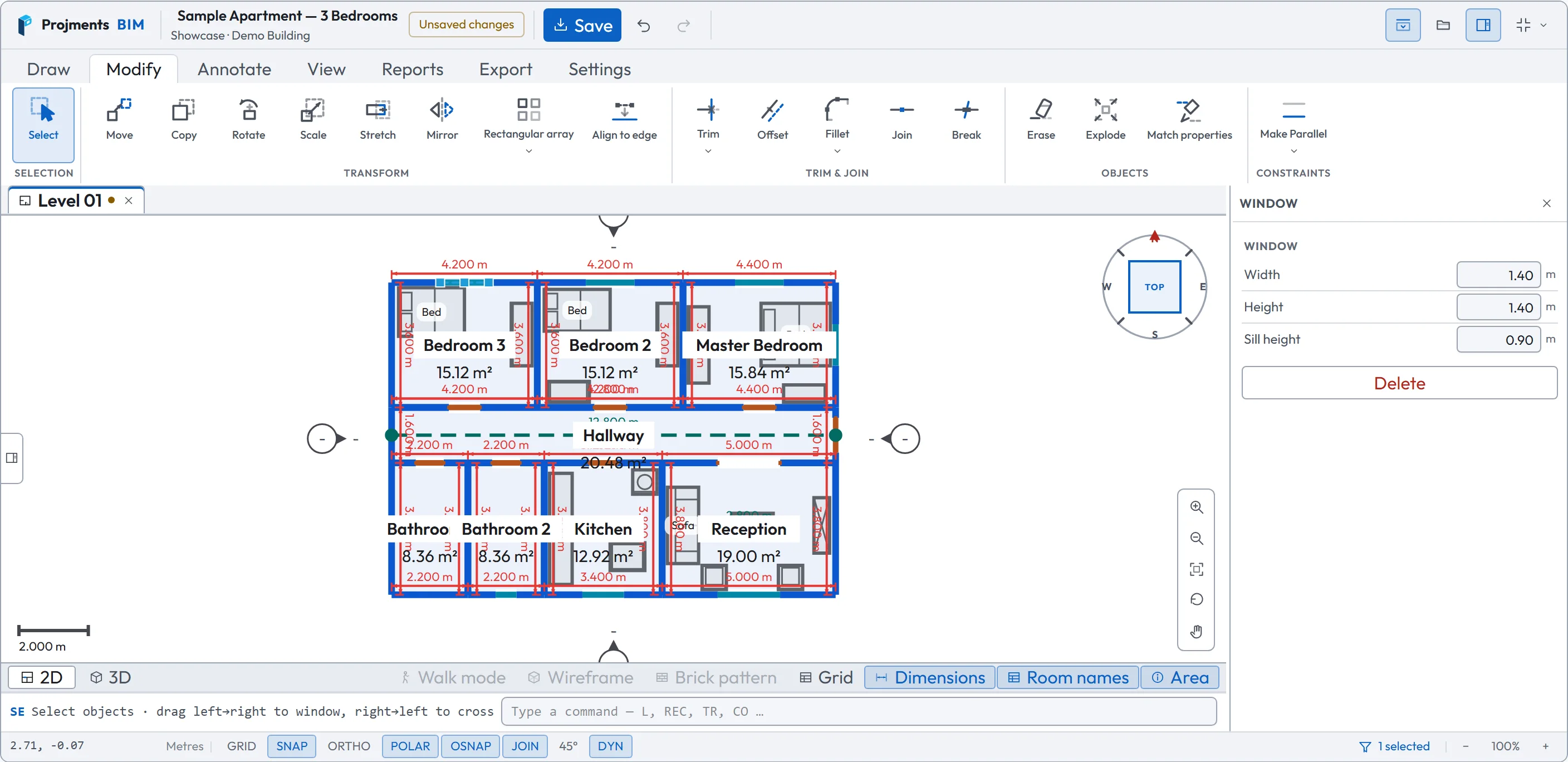
Move, copy, rotate, scale, stretch, mirror, array, align — then trim, offset, fillet, join and break.
Drag a grip to stretch or move what you picked.
Grid, snap, ortho, polar tracking, object snap, dynamic input.
Parallel, perpendicular, horizontal, vertical, angle, equal.
Type the width, height or sill — the plan follows.
- 1Transform, trim & joinMove, copy, rotate, scale, stretch, mirror, array, align — then trim, offset, fillet, join and break.
- 2ConstraintsParallel, perpendicular, horizontal, vertical, angle, equal.
- 3GripsDrag a grip to stretch or move what you picked.
- 4Edit by valueType the width, height or sill — the plan follows.
- 5Drafting aidsGrid, snap, ortho, polar tracking, object snap, dynamic input.
One model — the plan and the 3D move together
Switch the same view to 3D: walls at their measured height, openings cut, rooms labelled. Edit the plan and the model follows.
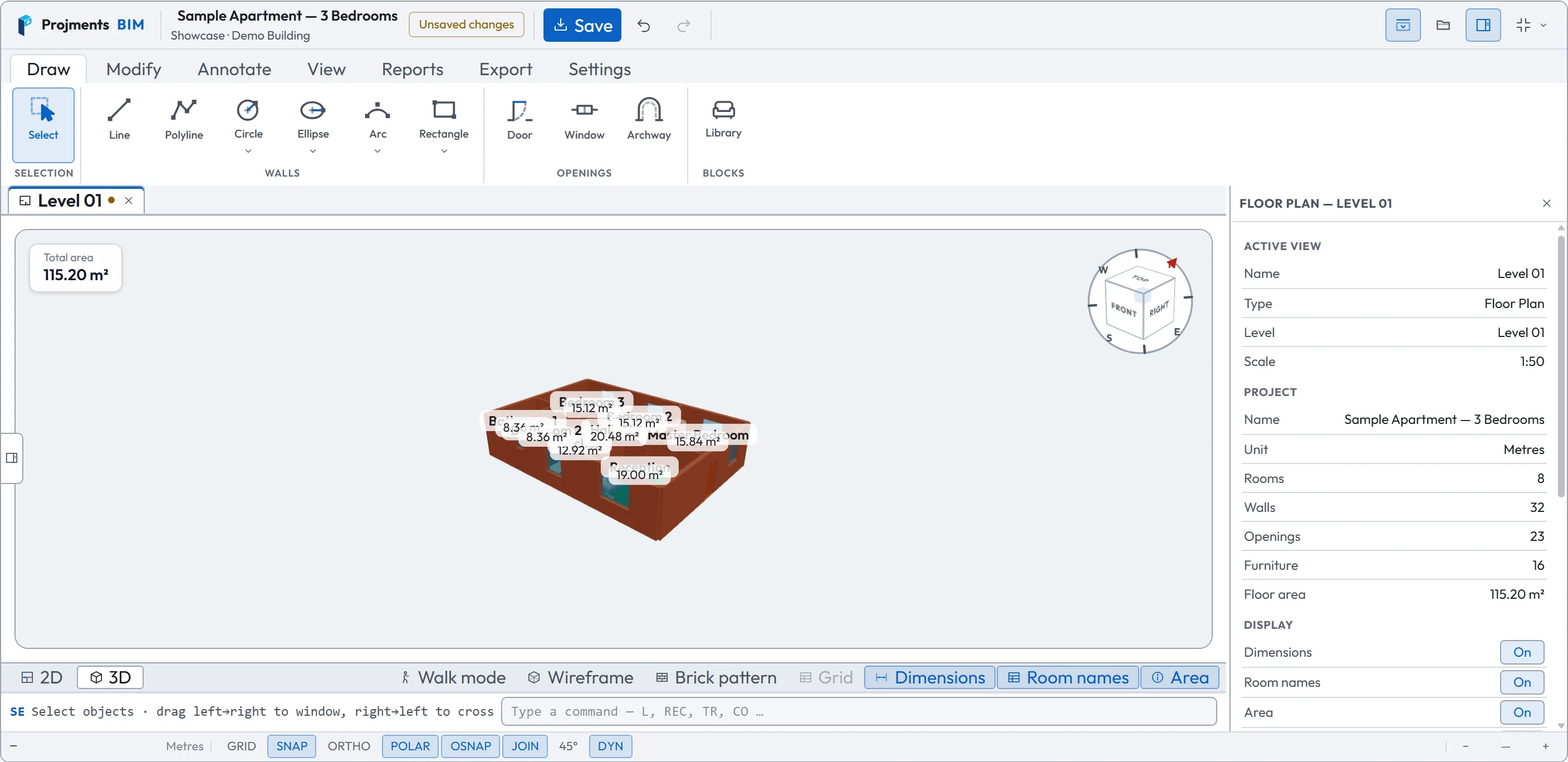
The floor area of the whole model.
Orbit with the mouse; furniture can be placed right in 3D.
The same view, either way.
Jump to front, top, sides or an isometric view.
Walk through at eye height, or see the model as lines or with a brick pattern.
- 12D or 3DThe same view, either way.
- 2Total areaThe floor area of the whole model.
- 3The modelOrbit with the mouse; furniture can be placed right in 3D.
- 4View cubeJump to front, top, sides or an isometric view.
- 5Walk, wireframe, brickWalk through at eye height, or see the model as lines or with a brick pattern.
Storeys, plans, elevations, sections — in one tree
The View List holds every view of the project. Open one and it comes from the model — nothing to redraw.
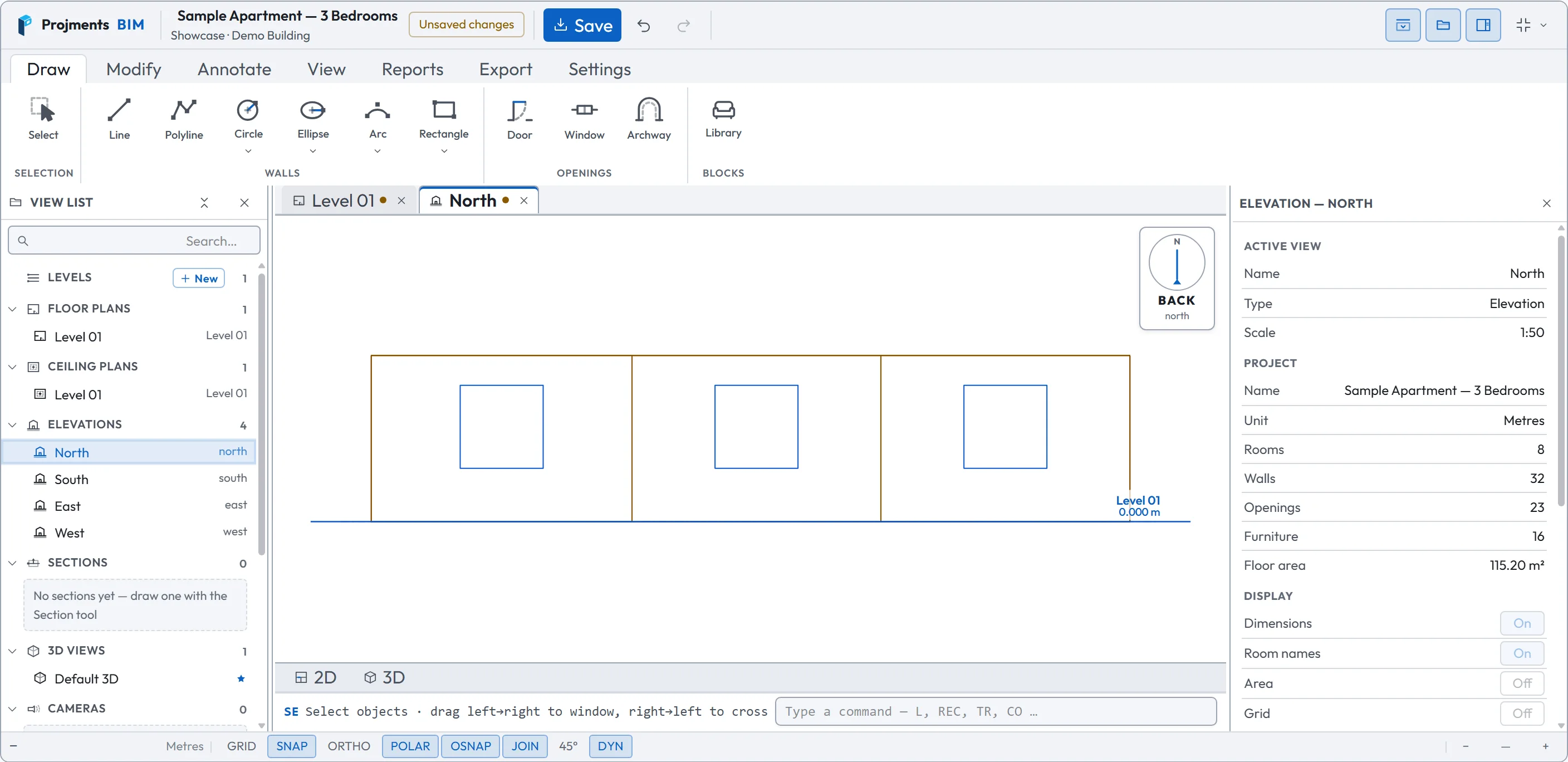
Add a storey with New — each level gets a floor plan and a ceiling plan.
North, south, east and west, ready made.
Cut one with the Section tool; it follows the model.
Level 01 and North, open side by side.
The walls and windows of that side, at Level 01.
- 1Levels & plansAdd a storey with New — each level gets a floor plan and a ceiling plan.
- 2ElevationsNorth, south, east and west, ready made.
- 3SectionsCut one with the Section tool; it follows the model.
- 4TabsLevel 01 and North, open side by side.
- 5The North elevationThe walls and windows of that side, at Level 01.
Schedules that count themselves
Every room with its area, perimeter, height, volume, doors and windows — read off the model, totalled at the foot.
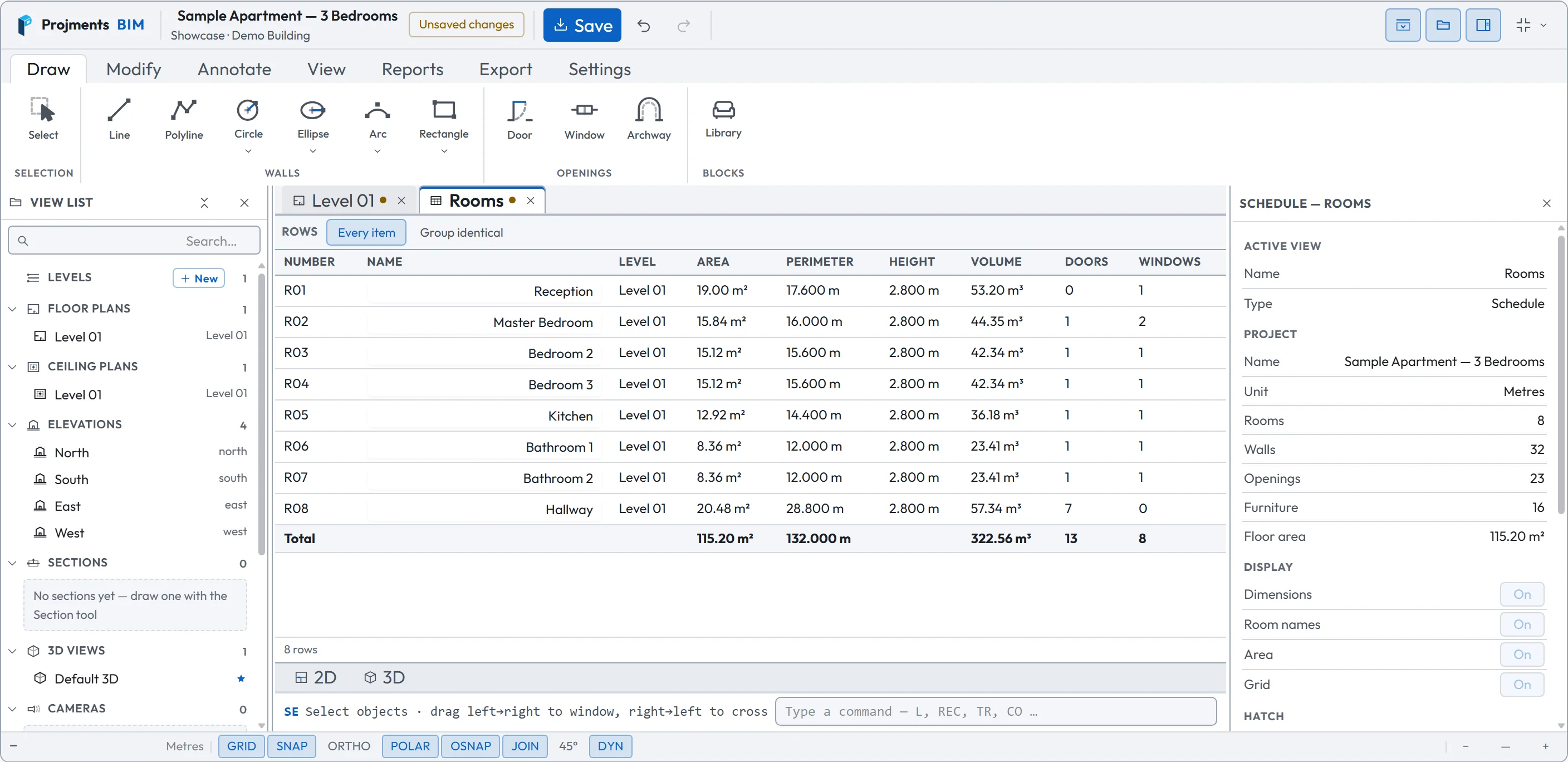
Rooms, Doors, Windows and Walls come with the project — one row per item, or identical items grouped.
115.20 m² and 322.56 m³ for the whole apartment.
Move a wall and the area changes here.
Counted per room, and totalled.
- 1A schedule is a viewRooms, Doors, Windows and Walls come with the project — one row per item, or identical items grouped.
- 2From the modelMove a wall and the area changes here.
- 3Doors & windowsCounted per room, and totalled.
- 4Totals115.20 m² and 322.56 m³ for the whole apartment.
635 pieces, and blocks of your own
Pick a piece and click in the plan or the 3D view to place it. Build your own parametric block once, with types and materials, and place it anywhere.
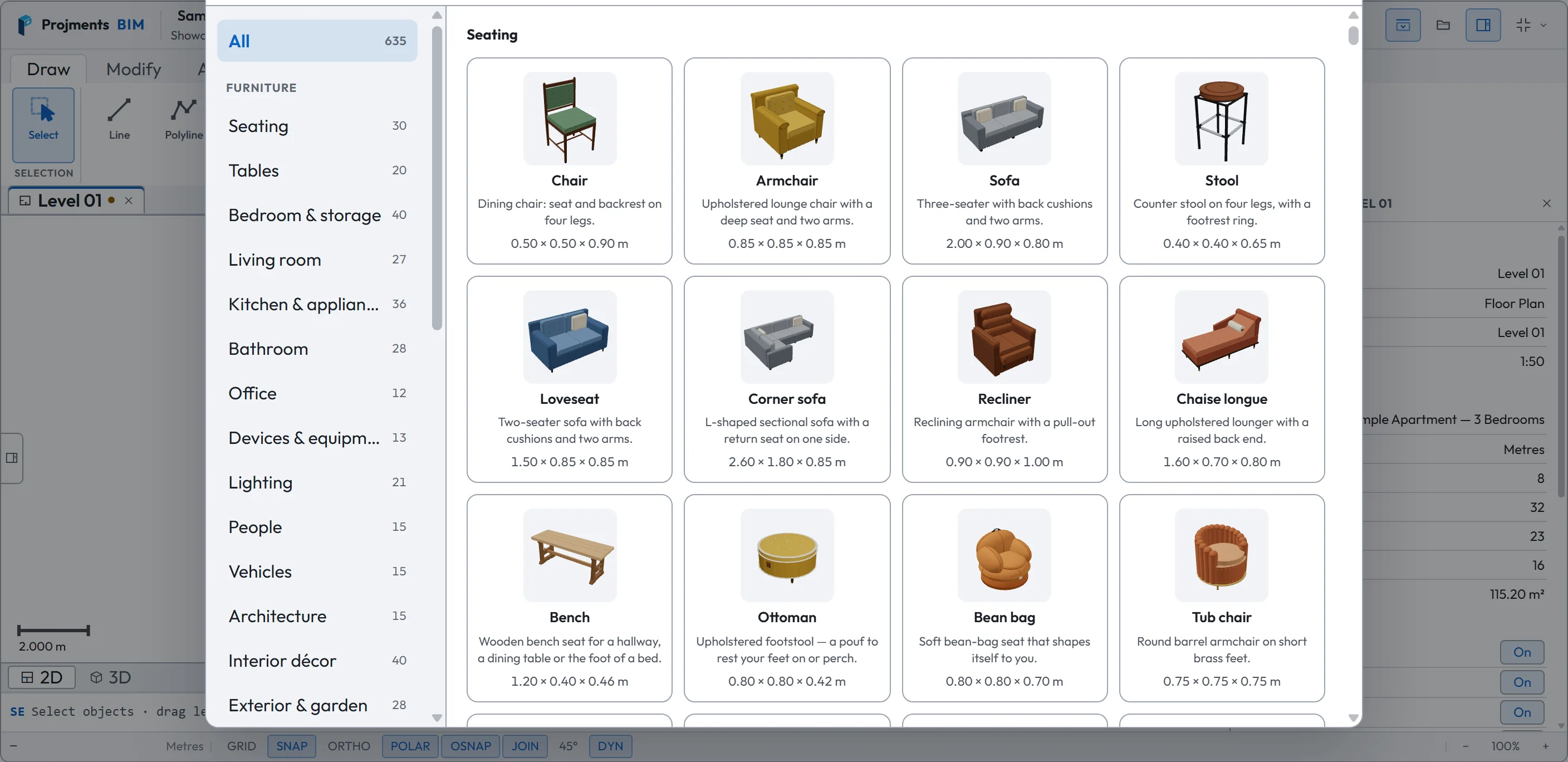
Everything in the library, searchable.
Seating, tables, kitchen, bathroom, lighting, MEP and more.
Every item is a 3D model, shown in plan and in 3D.
Width × depth × height, in your unit.
- 1All 635Everything in the library, searchable.
- 2CategoriesSeating, tables, kitchen, bathroom, lighting, MEP and more.
- 3A real 3D pieceEvery item is a 3D model, shown in plan and in 3D.
- 4Its sizeWidth × depth × height, in your unit.
Hand it on — files anyone can open
Choose the framing and what to include, then export. Drawings always go out on a light sheet, whatever your canvas colour.
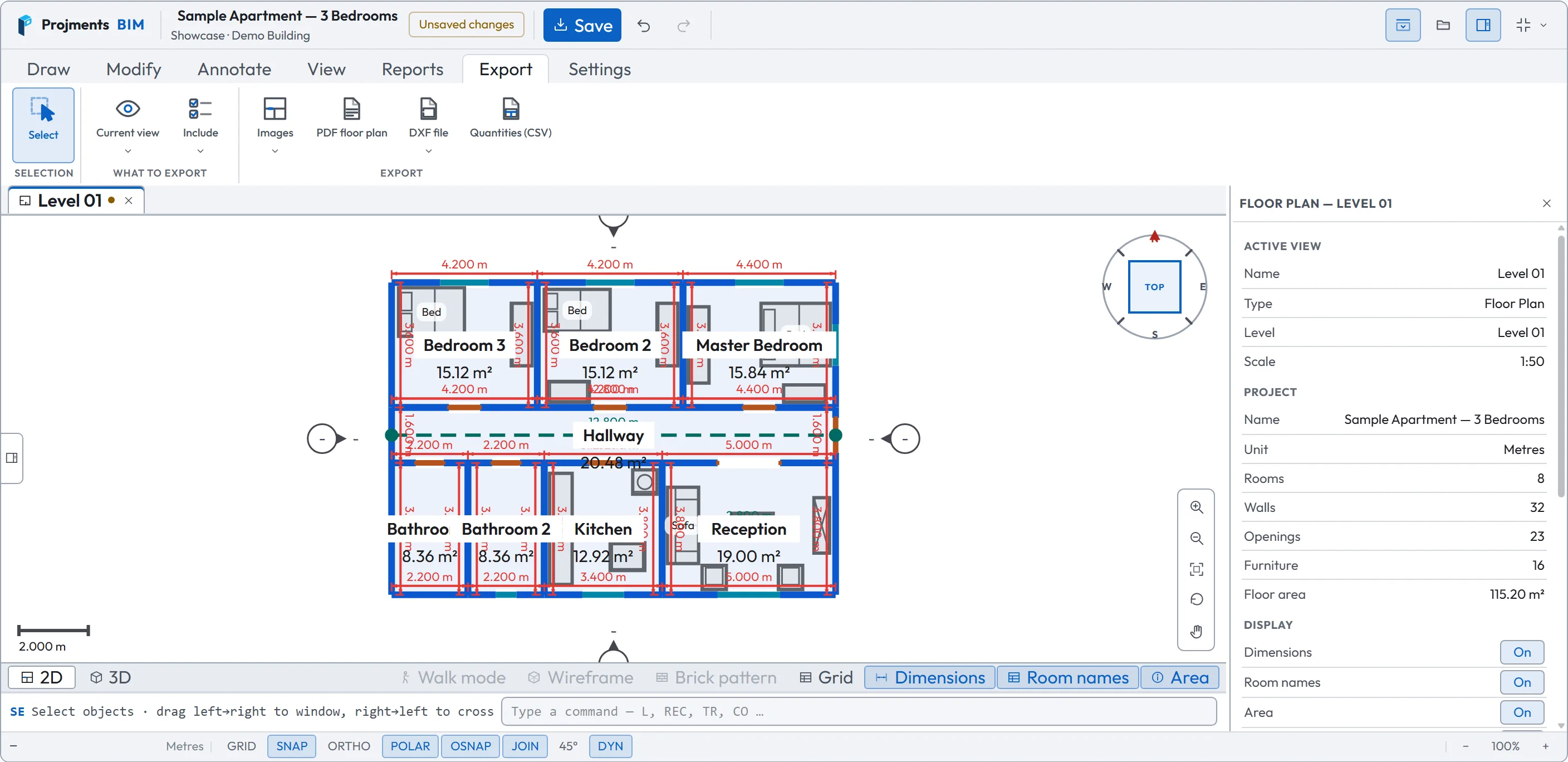
The current view or the full plan — and whether dimensions, room names, areas, hatch, text and lines go with it.
PNG image, SVG vector plan, A4 PDF floor plan, DXF 2D plan, DXF 3D model, CSV quantities for Excel, and a print report.
Exported drawings come out on white, whatever your canvas colour.
- 1What to exportThe current view or the full plan — and whether dimensions, room names, areas, hatch, text and lines go with it.
- 2Seven outputsPNG image, SVG vector plan, A4 PDF floor plan, DXF 2D plan, DXF 3D model, CSV quantities for Excel, and a print report.
- 3Always a light sheetExported drawings come out on white, whatever your canvas colour.
Every tab on the ribbon
What each one holds — and the Help Center guide that explains it in full.
Draw
- Walls from Line, Polyline, Circle, Ellipse, Arc and Rectangle (polygon and outline too)
- Door, Window and Archway on any wall
- Library: 635 furniture pieces and your own blocks
Modify
- Move, Copy, Rotate, Scale, Stretch, Mirror, Rectangular array, Align to edge
- Trim, Offset, Fillet, Join, Break
- Erase, Explode, Match properties — and constraints such as Make Parallel
Annotate
- Measure, and aligned, linear, angular, radius and diameter dimensions
- Text, with its own settings
- Hatch patterns, and lines that are not walls
View
- Pan, Zoom extents, Rotate view
- 2D, 3D and Split View
- Create Schedules, Sections and Elevations
Reports
- Rooms: every room with its measured figures
- Info: the project at a glance
- Schedules of rooms, doors, windows, walls, furniture, blocks or levels
Export
- PNG image and SVG vector plan
- PDF floor plan, DXF 2D plan and DXF 3D model
- Quantities as CSV, and a print report
Settings
- Theme: light, dark or system
- Drawing surface: dark or light canvas
- Your own keyboard shortcuts, and drafting options
No scan needed to start
Open a blank project and draw the plan by hand — scanning just saves you the measuring. Or open the sample apartment and try every tool; nothing you do there is saved.
The pictures on this page are screenshots of the workspace with the sample project.