See who is working on what, right now
A live read of the team’s time: who is tracking now, what each person last worked on, and how many hours the workspace logged over any period.
Every plan, including Free
Dashboard in 2 minutes
Every step on the real app. Jump to any chapter.
Who is working, right now
Live team activity and the hours logged over any period, on every plan.
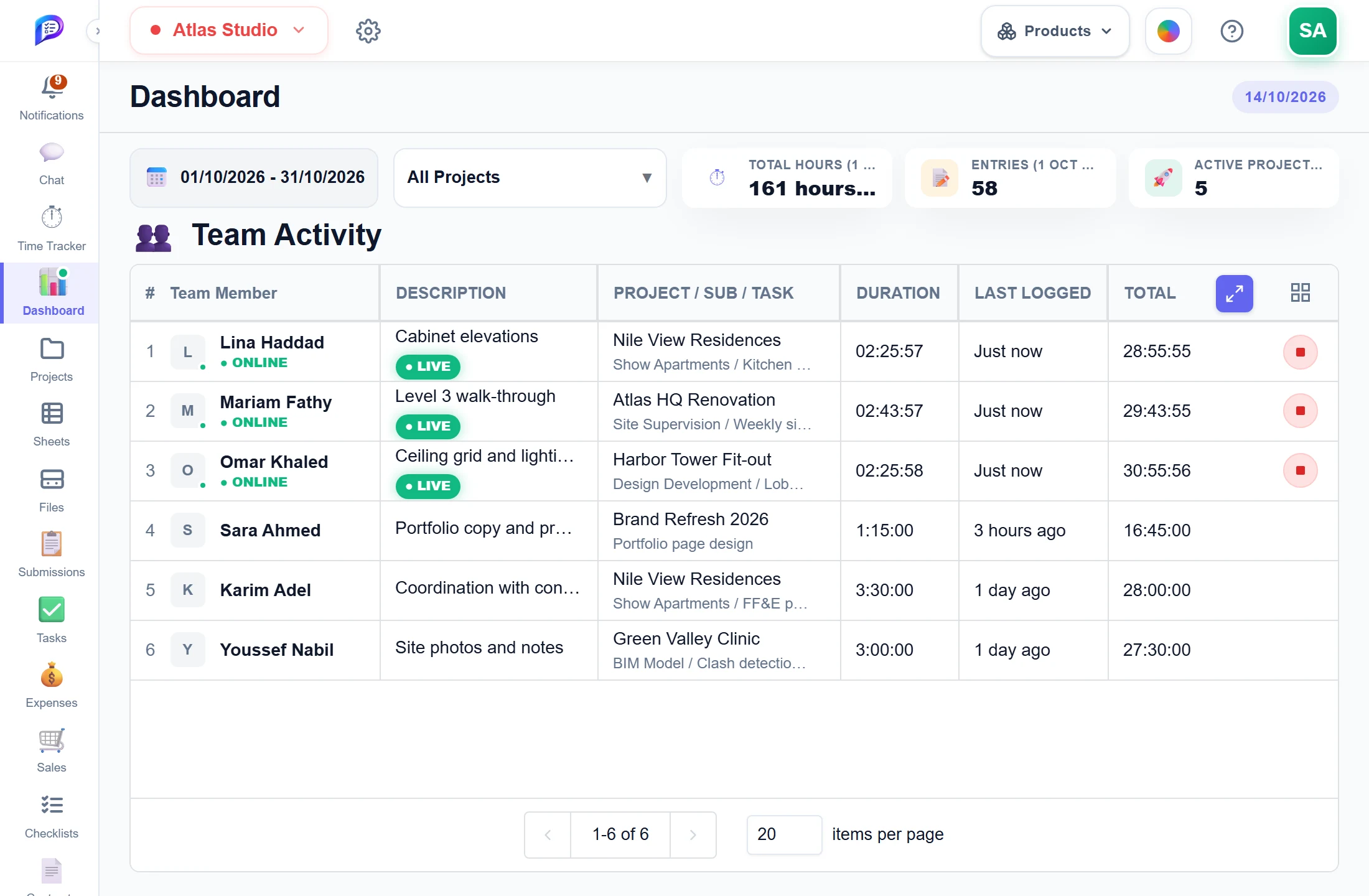
Today, week, month, quarter or your own range.
A green dot and LIVE tag on anyone with a running timer.
Total hours, entries and active projects.
The task, the project and a live clock.
Owners and time managers can stop it for them.
- 1Any periodToday, week, month, quarter or your own range.
- 2Period totalsTotal hours, entries and active projects.
- 3Online nowA green dot and LIVE tag on anyone with a running timer.
- 4What they are doingThe task, the project and a live clock.
- 5Stop a forgotten timerOwners and time managers can stop it for them.
Good to know
Live activity
A green dot and ● Online mark anyone with a running timer, with a ● LIVE tag and a live clock on their entry.
Three totals
Total Hours, Entries and Active Projects for the period you choose, matching the team table exactly.
Any period, any projects
Filter by Today, Week, Month, Quarter, All Time or a custom range, and narrow to one or more projects.
Stop a forgotten timer
The workspace owner and members with Manage or Full Access on Time Tracker can stop a teammate’s timer.
Respects access scope
Hours are only counted from projects inside your access scope, so each person sees the totals they are allowed to see.
Fresh without reloading
Running timers and today’s figures refresh about every minute, and the sidebar icon shows a green dot when someone is tracking.
Works hand in hand with
The pictures on this page are screenshots of Projments with a sample company's data.
Ready to Supercharge Your Team?
Projects, time, collaboration and results — all in one workspace.
✓Free plan available✓No credit card required✓Cancel anytime